Monday, November 4, 2013
Sunday, May 12, 2013
Personal List of Japanese Emoticons (Kaomoji)
from various sources. to be updated once in a while (2015/11/9)
one of the sources
HAPPY
( ̄▽ ̄人)
( ̄ー ̄)//””
(˘⌣˘)
(づ ̄ ³ ̄)づ
(ʃƪ ˘ ³˘)
(ɔˆ ³(ˆ⌣ˆc) ヾ(@°▽°@)ノ
(•‿•)
ʘ‿ʘ
ಥ⌣ಥ
( ・ิω・ิ)
(๑・ิ◡・ิ๑)
(๑・ิ◡・ิ๑)
(´・ω・`)
(♡˙³˙)
╰(*´︶`*)╯♡
(ฅ・ิω・ิฅ) (♡˙³˙)
╰(*´︶`*)╯♡
( ・ัω・ั )
( `ิิ∇´ิ)
(๑ت๑)♡
(๑ơ ₃ ơ)♥
(///▽///)
´ ▽ ` )ノ
(・∀・ )
ʘ‿ʘ
ಥ⌣ಥ
ಥ‿ಥ
( ಠ◡ಠ )
(ノ◕ヮ◕)ノ*:・゚✧
(∪ ◡ ∪)
(─‿‿─)
(。◕‿◕。)
(~ ̄▽ ̄)~
(。♥‿♥。)
(✿ ♥‿♥)
╭(๑¯д¯๑)╮
(▰˘◡˘▰)
◑‿◐)
(◕‿-)
(◕‿-)
(¬‿¬)
✖‿✖
。◕ ‿ ◕。
‘,:)
‘,:)
============================
SURPRISED
(・。・)
( ̄□ ̄;)!!
(°ㅁ°)‼
【o´゚□゚`o】
(⊙ヮ⊙)
⊙△⊙
(⊙ヮ⊙)
⊙△⊙
============================
ANGRY
o┤*`□´ *├o
ლ(ಠ益ಠლ)
щ(ಠ益ಠщ)
щ(ಠ益ಠщ)
(○`д´)ノシ Σ(っ゚Д゚)っ
(ノಠ益ಠ)ノ彡┻━┻
(╯°□°)╯︵ ┻━┻
(╯°□°)╯︵ ┻━┻ ====> ┬──┬ ノ( ゜-゜ノ)
(ò_ó)
(҂⌣̀_⌣́)
ψ(`∇´)ψ
( #`Д´)
(`ε´)
ヽ(o`皿′o)ノ٩(×̯×)۶
ಠ▃ಠ
o(-`д´- 。) ヽ
============================
ANNOYED
(¬_¬")
(;一_一)
(¯―¯٥)
( ̄へ ̄)
ಠ_ಠ
ఠ_ఠ
(-_- )ノ(¬_¬)
(◣_◢)
(॓_॔)
(;¬_¬)
(¬▂¬)
(•ˋ _ ˊ•)
(¬、¬)
Σ\( ̄ー ̄;)
============================
CONFUSED
¯\(°_o)/¯
(゜д゜??)
(゚Д゚≡゚Д゚)
ヽ(´Д`ヽミノ´Д`)ノ
ヽ(゚Д゚)ノ
щ(゚Д゚щ)
ヽ(`Д´)ノ (д´ノ) ヽ( )ノ (ヽ´△) ヽ(´△`)ノ
(。ŏ_ŏ)
Σ(=ω= ;)
((((゜д゜;))))(•⊙ω⊙•)
(╯ಊ╰)
(⊙_◎)
(+_+)
(。• . •。)??
⊙﹏⊙
============================
(。。;)\(-_-
(ಥ﹏ಥ)
(。ĭ﹏ĭ) ( ĭ﹏ĭ ) (ĭ﹏ĭ。)
( ó﹏ò。)
('-' ) (._. ) ( ._.) ( '-')
(;_;)
(´;ω;`)
(╥_╥)(╯_╰)
(╯3╰)
(╯︵╰,)
(︶︹︺)
(∩︵∩)
(✖╭╮✖)
============================
CHARACTER
ʕ •ᴥ•ʔ Koala
/人◕ ‿‿ ◕人\ Kyubey
(。▼皿▼) Darth Vader
(◟ᅇ)◜ Ghost
(  ̄┏_┓ ̄) Chinese Mustache
[¬º-°]¬ Zombie
| (• □•) | (❍ᴥ❍ʋ) finn jake
(●__●) finn stare
ᶘ ᵒᴥᵒᶅ pedobear
ㅇㅅㅇ cat
(ΦωΦ)
(ΦωΦ)
(・◇・)bird
( ͡° ͜ʖ ͡°)
( ̄(エ) ̄)(ΘεΘ;)
(✪㉨✪)
(╹ェ╹)
(=゜ω゜)
(✿◠‿◠)
(◡‿◡✿)
(◕‿◕✿)
ԅ(≖‿≖ԅ) pervert
(´༎ຶ༎ຶ) Eren
(¬_¬ ) Mikasa
(´°̥̥̥̥̥̥̥̥﹏°̥̥̥̥̥̥̥̥`) Armin
(눈_눈) Levi
°˖✧∩(◎ヮ◎∩)✧˖° Hanji
(ง •̀ゝ•́)ง Annie
(๑╹ڡ╹๑) Sasha
ლ(ಠ_ಠლ) Jean
============================
MISCELLANEOUS
Flexing
ᕦ(ò_óˇ)ᕤ
ᕦ(ò_óˇ)ᕤ
ᕙ(⇀‸↼‶)ᕗ
ᕦ(ò_óˇ)ᕤ “
ᕦ(ò_óˇ)ᕤ “
Sleepy
(-_ゞ
(つд`)
_(:3 」∠)_
(o_-)
(・ェ-)
(-_ゞ
(つд`)
_(:3 」∠)_
(o_-)
(・ェ-)
Hiding
(・_・;)_・)
(・_・;)_・)
ヘ(・_|
|д・)
┬┴┬┴┤(・_├┬┴┬┴
(・_・|
(ノ_・。)
┬┴┬┴┤(・_├┬┴┬┴
(・_・|
(ノ_・。)
Yum
ლ(´ڡ`ლ)
(º﹃º)
ლ(́◉◞౪◟◉‵ლ)
ლ(´ڡ`ლ)
(º﹃º)
ლ(́◉◞౪◟◉‵ლ)
Whatever
( ̄ー ̄(_ _(
╮(─▽─)╭
(=ω=;)
Amazed
(╯◕_◕)╯
( ̄ー ̄(_ _(
╮(─▽─)╭
(=ω=;)
Amazed
(╯◕_◕)╯
Scared
⁀⊙﹏☉⁀
⁀⊙﹏☉⁀
Dancing
(☞゚∀゚)☞
┌(・。・)┘♪└(・。・)┐♪┌(・。・)┘
Okay
(°_° (°_° (°_° )
( ˙-˙ )
(・-・。)
(☞゚∀゚)☞
┌(・。・)┘♪└(・。・)┐♪┌(・。・)┘
Okay
(°_° (°_° (°_° )
( ˙-˙ )
(・-・。)
( ˙³˙)
(・_・)
( ゚,_ゝ゚)
≖‿≖
( ̄□ ̄)
(´ー`)
(・_・)
( ゚,_ゝ゚)
≖‿≖
( ̄□ ̄)
(´ー`)
Sorry
(シ_ _)シ
Shy
(n˘v˘•)¬
============================
♩♬
♩♬
☆┳┓
┃┃┣┳┓ ★━┳━┳━┳━┳━┓
┣━┻┫┃┃┃┃━┫┃┃┏┫━┫
┃┏━┻┫┃┏┫━┫┳┃┗┫━┫
┗━┓┏┛┗┛┗━┻┻┻━┻━★
┃┃┣┳┓ ★━┳━┳━┳━┳━┓
┣━┻┫┃┃┃┃━┫┃┃┏┫━┫
┃┏━┻┫┃┏┫━┫┳┃┗┫━┫
┗━┓┏┛┗┛┗━┻┻┻━┻━★
☆╭┐ ┌╮☆°.·
╭ ┘ └┘ └ ╮∴°☆°
└┐. .┌┘-----╮∴°
╭┴-------┤ ├╮
│o o │ -│●°
└┐. .┌┘-----╮∴°
╭┴-------┤ ├╮
│o o │ -│●°
╰┬-------╯ │ ∴°·
☆\__|__/__/__ /∴☆. ============================
Wednesday, July 18, 2012
Alternative to Photoshop
Hi!! It's been quite sometime since I last post anything isn't it.
It's gonna be short this time. Eventually I've got an alternative for Photoshop.
It's called ArtWeaver. The tools in this program is as good. It's lightweight and it even had a free version!!
Check it out! http://www.artweaver.de
It's gonna be short this time. Eventually I've got an alternative for Photoshop.
It's called ArtWeaver. The tools in this program is as good. It's lightweight and it even had a free version!!
Check it out! http://www.artweaver.de
Thursday, February 9, 2012
Downloading Links from Maxthon using Internet Download Manager (IDM)
Apparently, it is stated that Internet Download Manager (IDM) is NOT supported for Maxthon.
But I actually found out how to download links using IDM through Maxthon in several simple steps.
Here is it:
Let's download a link in Mediafire for an example.
When the download link appears, right click on the link and select "Copy Shortcut"

Then a pop-up from IDM will show up.
Click "Ok" and there you go!

Simply the reason for this is that IDM had capture a link to download when we copy the link.
Hope this helps!
But I actually found out how to download links using IDM through Maxthon in several simple steps.
Here is it:
Let's download a link in Mediafire for an example.
When the download link appears, right click on the link and select "Copy Shortcut"

Then a pop-up from IDM will show up.
Click "Ok" and there you go!

Simply the reason for this is that IDM had capture a link to download when we copy the link.
Hope this helps!
Saturday, June 11, 2011
R4i/R4SDHC Skin Tutorial
This tutorial’s goal is to make an R4i or R4-SDHC skin manually
Sample used in this tutorial
You’ve been searching for skins but not even one suite your liking
And you can’t do a proper job with the R4i Skin Maker
Here is a tutorial on how to make skins for R4i/R4-SDHC manually
*I’m not a computer geeky so this tutorial use really simple(?) programs (I use Microsoft Office Picture Manager, Photoscape 3.5 and Photoshop CS4)
[UPDATE!!] Found an alternative for Photoshop http://naitozekkyou.blogspot.com/2012/07/alternative-to-photoshop.html
I just happen to discover this while stressing out because of the R4i Skin Maker
Final R4i/R4-SDHC:
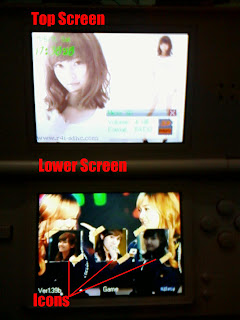
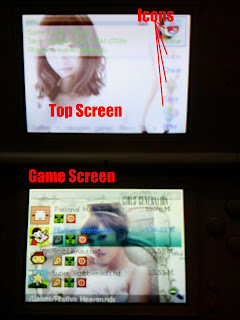
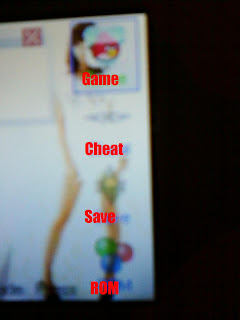
First, you need 3 pictures for the screens, 3 pictures for the icons at the Lower Screen and 4 pictures for the icons at the Top Screen (right side)
For screens, resize the picture to 256x192
For icons at the Lower Screen, resize to 72x72
For icons at the Top Screen (right side), resize to 32x32
LOWER SCREEN
1. Open Photoscape
2. Click on the Editor tab
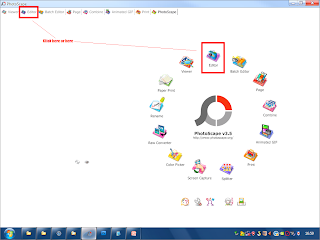
3. Click the image for the Lower Screen at the lower right tab
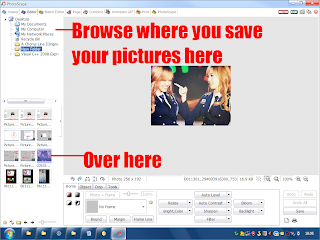
4. Open the pictures for the Icons
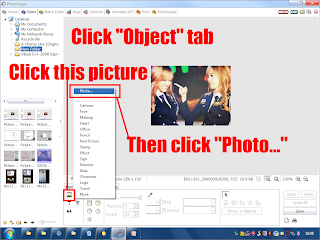
5. Now for the location of the pictures
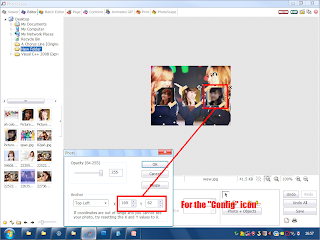
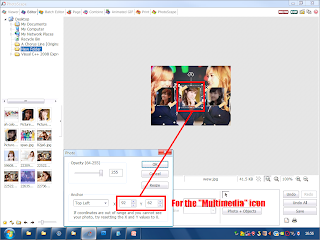
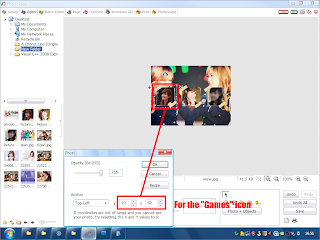
6. Then save the pictures
7. Now open Photoshop
8. Open the picture before
9. Then save it using the following configurations
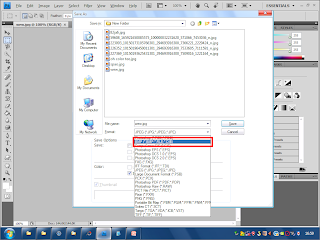
10. Save it as a .BMP file
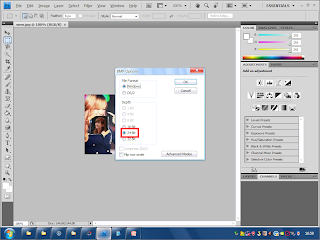
11. Then set it to 24 Bit
You’re done with the Lower Screen
For the Top Screen and Game Screen, you can repeat from Step 7
ICONS AT THE TOP SCREEN (RIGHT SIDE)
1. Open Photoshop
2. Open the picture you’ve edited
3. Follow the instructions in the picture
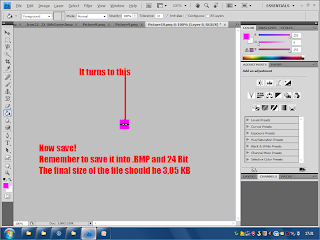
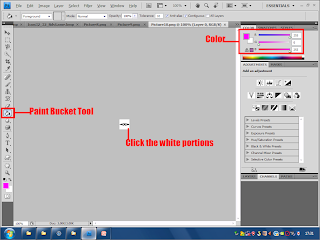
You’re done with the icons
TIPS: You can actually use icons from real icons in the computer
Just print screen the icon and crop it to 32x32
FINISHING
Now you’ve done editing all necessary images, rename them:
Top Screen - TScreen.bmp
Lower Screen - BottomInit.bmp
Game Screen - BottomScreen.bmp
Game - Icon32_32_NdsGame.bmp
Cheat - Icon32_32_Cheat.bmp
Save - Icon32_32_Language.bmp
ROM - Icon32_32_Setting.bmp
Sample used in this tutorial
You’ve been searching for skins but not even one suite your liking
And you can’t do a proper job with the R4i Skin Maker
Here is a tutorial on how to make skins for R4i/R4-SDHC manually
*I’m not a computer geeky so this tutorial use really simple(?) programs (I use Microsoft Office Picture Manager, Photoscape 3.5 and Photoshop CS4)
[UPDATE!!] Found an alternative for Photoshop http://naitozekkyou.blogspot.com/2012/07/alternative-to-photoshop.html
I just happen to discover this while stressing out because of the R4i Skin Maker
Final R4i/R4-SDHC:


First, you need 3 pictures for the screens, 3 pictures for the icons at the Lower Screen and 4 pictures for the icons at the Top Screen (right side)
For screens, resize the picture to 256x192
For icons at the Lower Screen, resize to 72x72
For icons at the Top Screen (right side), resize to 32x32
LOWER SCREEN
1. Open Photoscape
2. Click on the Editor tab

3. Click the image for the Lower Screen at the lower right tab

4. Open the pictures for the Icons

5. Now for the location of the pictures


6. Then save the pictures
7. Now open Photoshop
8. Open the picture before
9. Then save it using the following configurations

10. Save it as a .BMP file

11. Then set it to 24 Bit
You’re done with the Lower Screen
For the Top Screen and Game Screen, you can repeat from Step 7
ICONS AT THE TOP SCREEN (RIGHT SIDE)
1. Open Photoshop
2. Open the picture you’ve edited
3. Follow the instructions in the picture


You’re done with the icons
TIPS: You can actually use icons from real icons in the computer
Just print screen the icon and crop it to 32x32
FINISHING
Now you’ve done editing all necessary images, rename them:
Top Screen - TScreen.bmp
Lower Screen - BottomInit.bmp
Game Screen - BottomScreen.bmp
Game - Icon32_32_NdsGame.bmp
Cheat - Icon32_32_Cheat.bmp
Save - Icon32_32_Language.bmp
ROM - Icon32_32_Setting.bmp
Friday, November 12, 2010
FormatFactory Tutorial (*.VOB)
Subscribe to:
Posts (Atom)


